Architecture, Manual Methods, and Automation — Harbour Mechanical Services: HVAC Service Integration Hub. Enterprise Integration & Orchestration Platform. Author: Diana J. Hakim. Date: September 30, 2026.
Abstract
This comprehensive technical documentation outlines the architecture, integration model, security controls, workflow orchestration, reliability mechanisms, data model, and operational interfaces of the Harbour Mechanical Services HVAC Service Integration Hub.
The system was designed around a fictional HVAC service company operating multiple independent business systems — a customer relationship management platform, a scheduling system, an inventory system, an accounting platform, and a customer notification service. Rather than replacing these systems or allowing them to communicate through fragile point-to-point integrations, the project introduces a centralized Integration Hub responsible for coordinating business workflows, translating between system-specific data contracts, enforcing authentication and authorization, preventing duplicate operations, recording audit history, and recovering from temporary external-system failures.
The documentation follows the complete lifecycle of a service call: from initial customer request, through customer synchronization and CRM case creation, technician assignment and scheduling, field-service completion, parts consumption, invoice generation, and customer notification.
Particular attention is given to distributed-system concerns that are normally invisible in a conventional CRUD application. The Hub uses deterministic idempotency keys, integration event tracking, correlation IDs, retry queues, dead-letter queues, structured logging, webhook verification, and audit logging to ensure that failures do not silently produce inconsistent business state.
The project uses TypeScript, Node.js, Express, PostgreSQL, Docker, Zod validation, JWT authentication, RBAC, and independently isolated mock external systems. Each mock system owns its own database and exposes an HTTP API, allowing the Hub to interact with them as though they were separate third-party or legacy business platforms.
Introduction
The unexpected discovery of an abandoned ASUS laptop running Ubuntu OS at the university library marked the beginning of a thorough digital forensics investigation. Believed to belong to an individual operating under the online nickname “subzero,” the machine is heavily suspected of being the focal point for a series of unauthorized cyber incidents targeting various campus departments, including the library and research labs. Preliminary reports from campus security and local law enforcement suggested the device was actively involved in deploying sophisticated botnets and malware variants acquired from external sources.
This technical assessment delves deep into the system’s digital artifacts to reconstruct the timeline and nature of the activity. By systematically examining core system parameters, web browsing habits, recycle bin residues, installed software suites, and hidden user directories, this report uncovers the mechanisms behind the planned and executed attacks. Furthermore, it pieces together behavioral and linguistic indicators to establish a definitive profile of the machine’s owner, shedding light on their technical proficiency, academic standing, and operational footprint.
Harbour Mechanical Services
Harbour Mechanical Services is a fictional HVAC contractor used as the reference scenario throughout this document. The organization’s profile defines the load and complexity the architecture must handle:
| Attribute | Value |
|---|---|
| Field technicians | 15 |
| Office / dispatch staff | 3 |
| Management | 1 |
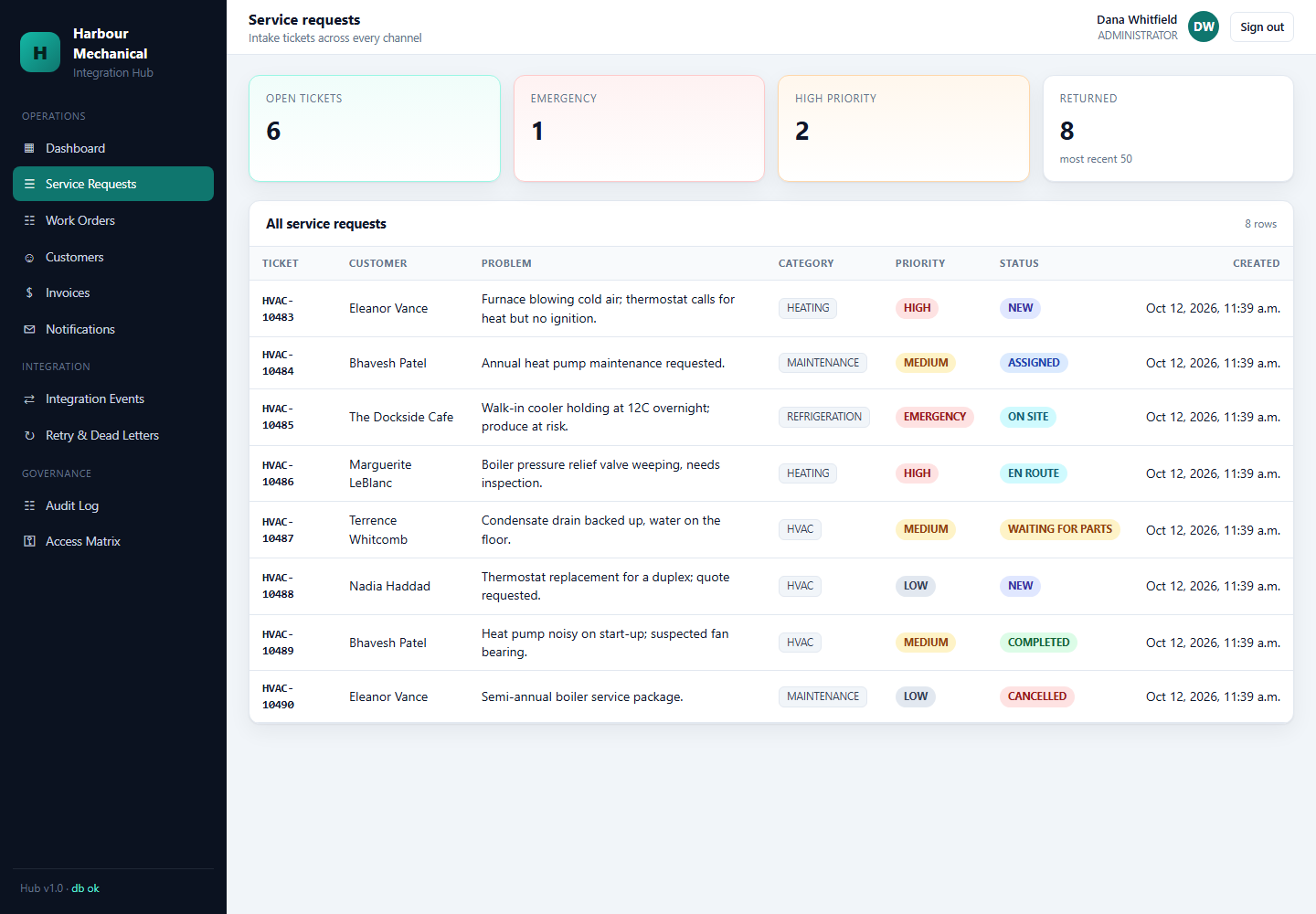
| Active customers | ~1,500 |
| Service calls per week | 50–100 |
| Systems of record | 5 (CRM, Scheduling, Inventory, Accounting, Notifications) |
These figures define the scenario used to evaluate the architecture; Harbour Mechanical Services is a fictional organization created for this project.
Business Scenario & System Discovery
Before any code can be written, the integration engineer must first discover what systems exist, what each owns, and where the boundaries between them lie. This is the equivalent of a subnet-planning exercise’s “Determine the Parent Block” step: identify the raw material before subdividing it.
Existing Systems
Each business system owns a distinct slice of the organization’s data. The Hub never assumes ownership of any of it.
CRM (Customer Relationship Management)
Owns: customers, service cases, customer history, case notes, case status.
Purpose: system of record for the customer relationship. All customer-identifying data originates here; the Hub maintains only a mirror for matching purposes.
Scheduling
Owns: technicians, availability windows, appointments, work-order-to-appointment bindings.
Purpose: system of record for time. Every appointment is created here first, then mirrored downstream.
Inventory
Owns: parts catalog, stock levels, inventory movements (issue, return), per-warehouse balances.
Purpose: system of record for physical stock. Every part consumed or returned on a job generates an inventory movement.
Accounting
Owns: accounting customers, invoices, invoice lines, ledger transactions (double-entry).
Purpose: system of record for financial state. Every billable job produces an invoice with balanced debit/credit lines.
Notifications
Owns: email/SMS message records, notification history, delivery status.
Purpose: downstream communication. Notifications never block or roll back the business transaction that triggered them.
System Boundary Principle
Each system is intentionally isolated behind its own HTTP API and database. The Integration Hub interacts with them only through typed connectors — it never reads or writes their tables directly. This is the most important architectural decision in the entire project and is revisited in the External System Architecture and Data Model sections.
Current-State Business Process
The Manual Workflow
This diagram captures the manual, pre-Hub workflow that Harbour Mechanical Services used before the Integration Hub existed. It shows how a single customer request fans out through Office Staff into three disconnected record-keeping systems — a CRM, a shared calendar, and a spreadsheet — before the technician can even be dispatched. The critical weakness is visible in the structure itself: there is no central coordinator, so every arrow represents a manual handoff where data can be dropped, mistyped, or duplicated. The diagram ends the same way it begins, at the Customer, which emphasises that the business process is a closed loop whose reliability depends entirely on human diligence at each hop.
Weaknesses
| Weakness | Consequence |
|---|---|
| Duplicate data entry | Customer information entered into multiple systems, often inconsistently. |
| Inconsistent state | One system says an appointment is confirmed while another has not received the update. |
| Inventory discrepancies | Parts used by technicians may not immediately appear in the inventory system. |
| Delayed invoicing | The accounting system may not receive completed work until days later. |
| Poor failure visibility | If an external API or a manual handoff fails, staff may not know whether the operation completed. |
Why Manual Integration Breaks Down
Manual integration is reliable for a handful of operations per day, but becomes error-prone the moment volume increases. At 50–100 service calls per week, each producing 4–6 cross-system operations, the number of manual handoffs exceeds 300 per week — and a single mistyped customer ID at any handoff can produce an invoice addressed to the wrong customer or an appointment booked against a decommissioned technician.
Integration Problems & Requirements
The requirements below define what the Integration Hub must do. They are expressed as business requirements first, then translated into technical requirements.
Business Requirements
| ID | Requirement |
|---|---|
| BR-01 | The business should have one integration layer responsible for coordinating external systems. |
| BR-02 | Information should be transferred automatically between systems where possible. |
| BR-03 | Retrying an operation must not create duplicate customers, invoices, appointments, or inventory movements. |
| BR-04 | Temporary external-service failures should automatically retry. |
| BR-05 | Operations that cannot succeed automatically should enter a DLQ for investigation. |
| BR-06 | Staff should be able to determine what happened to an individual business operation. |
Technical Requirements
| ID | Requirement |
|---|---|
| TR-01 | All external system access flows through typed HTTP connectors. No direct database access across system boundaries. |
| TR-02 | Every cross-system mutation is assigned a deterministic idempotency key derived from the business operation, not from a random UUID. |
| TR-03 | Every workflow execution is recorded as an integration_event with child integration_event_steps. |
| TR-04 | Every request carries a correlation ID that is propagated to all downstream calls. |
| TR-05 | Transient failures (HTTP 5xx, timeouts, connection refused) enter a retry queue with jittered exponential backoff. |
| TR-06 | Failures that exhaust retry attempts enter a dead-letter queue and can be manually retried or resolved. |
| TR-07 | Inbound webhooks are verified via HMAC-SHA256 with timestamp tolerance and constant-time comparison. |
| TR-08 | Authentication uses JWT access/refresh with rotation, refresh tokens stored only as SHA-256 digests, and reuse detection. |
| TR-09 | Every significant operation writes an append-only audit record (actor, action, resource, result, request ID). |
| TR-10 | All vendor wire contracts are validated by Zod schemas; canonical domain types are separated from vendor types via transformers. |
Solution Overview
Platform at a Glance
This diagram shows the entire platform in one view. Three human entry points — the customer, the dispatcher, and the technician — interact with a single Integration Hub, which is the only component allowed to communicate with the five external systems of record: CRM, Scheduling, Inventory, Accounting, and Notifications. The solid arrows represent the normal request path: every business operation enters through the Hub, and every external call originates from it. The dotted feedback loops represent the reliability machinery: when a cross-system call fails transiently, it enters the Retry Queue and is re-attempted with backoff; when it fails persistently, it enters the Dead Letter Queue for manual investigation. No external system talks directly to any other, and no external system talks directly to a human — the Hub is the sole coordinator. This single-image mental model is the foundation for every section that follows.
Why the Hub Exists
Without a Hub, every system must know about every other system it interacts with. Adding a new system (say, a real Twilio connector replacing the mock notification service) requires modifying every caller. With the Hub, only the Hub changes. This is the same abstraction benefit that a network’s core router provides over point-to-point links between every pair of hosts.
The problem the Hub solves is not “how do we move data between systems” — that is a solved problem in every language. The problem is “how do we move data between systems without producing inconsistent state when something fails halfway through.” A direct integration that calls the CRM and then the Scheduling system will leave the CRM holding a customer that the Scheduling system never saw if the second call fails. The Hub solves this by treating every multi-system operation as a named workflow whose progress is recorded, whose steps are individually idempotent, and whose failures are routed to durable queues rather than being lost in a stack trace.
Core Design Principles
Five principles govern every architectural decision in the Hub. They are stated here in the order they appear in the codebase, because each one builds on the previous.
- External systems own their own data. The Hub never writes to
hvac_crm.customersdirectly. It calls the CRM API. If the CRM’s schema changes, the Hub is unaffected as long as the wire contract holds. - The Hub orchestrates workflows, not tables. Each workflow is a named sequence of steps, and each step is a single call to one external system. The Hub’s job is to coordinate, not to compute.
- Every cross-system operation is idempotent. Retries cannot duplicate work because every mutation is keyed by a deterministic value derived from business identity, not from a random UUID.
- Transient failures retry; persistent failures preserve. HTTP 5xx and timeouts enter the retry queue with jittered exponential backoff. HTTP 4xx and schema validation errors enter the dead-letter queue immediately. Nothing is silently discarded, and nothing is silently duplicated.
- Everything is observable. Every operation is traceable through integration events, correlation IDs, structured logs, and an append-only audit history. An operator can reconstruct exactly what happened to any business operation, across every system it touched.
Hub Internal Modules
This diagram shows the Integration Hub as the single coordination point between customer-facing entry points and the five back-office systems. Where the previous diagram fanned out into disconnected tools, this one funnels everything through one well-defined intermediary whose internal capabilities are explicitly enumerated: authentication, RBAC, validation, workflow orchestration, connectors, transformers, event storage, retry handling, dead-letter handling, and audit logging. The key architectural takeaway is that adding a new external system (say, a real Twilio connector) requires changing only the Hub — not the entry points, not the other back-office systems.
Integration Hub Architecture
The Hub is composed of distinct modules, each with a single responsibility.
Module Inventory
| Module | Responsibility |
|---|---|
| Authentication | Login, refresh-token rotation, logout, reuse detection. |
| RBAC | Role-based permission guards on routes and workflows. |
| HTTP Layer | Express server, middleware chain, error handling, rate limiting. |
| Workflow Engine | Named workflows (service-request, dispatch, job-completed) that orchestrate steps. |
| Connectors | Typed HTTP clients, one per external system. |
| Transformers | Convert canonical domain types ↔ vendor wire contracts. |
| Event Store | Records integration_events and integration_event_steps. |
| Retry Worker | Polls the retry queue and re-executes named operations. |
| Audit System | Append-only audit log with actor/action/resource tracking. |
| Database | hvac_hub — hub-owned tables only. |
Request Lifecycle Through the Hub
This diagram traces the exact path an inbound request takes once it reaches the Hub, from rate limiting through authentication, RBAC enforcement, Zod validation, workflow execution, connector calls, event recording, and audit logging, finally producing a response. It matters because it shows that security and observability are not afterthoughts bolted onto the end — they are enforced as a strict middleware chain that every request must pass through before any business logic runs. If any stage rejects the request (bad token, missing permission, invalid body), the later stages never execute, which is exactly the property that makes the Hub safe to expose to untrusted callers.
Automated Logic
- Phase 1 (Request Admission). Apply rate limiting, authenticate the caller via JWT, enforce RBAC, and validate the body against a Zod schema.
- Phase 2 (Workflow Execution). Create an integration_event row, then execute each step in the named workflow. Each step calls one connector and records an integration_event_step row.
- Phase 3 (Failure Routing). If a step fails with a transient error, enqueue a retry. If it fails with a persistent error or exhausts retries, enqueue a dead-letter entry.
- Phase 4 (Audit & Response). Write an audit record for the business action, then return a response that includes the event ID and correlation ID.
Tool Implementation Code
// src/services/integration-hub/modules/workflows/run-workflow.ts
// Execute a named workflow as a sequence of instrumented steps.
export async function runWorkflow<T>(
  name: WorkflowName,
  ctx: WorkflowContext,
  steps: WorkflowStep<T>[],
): Promise<WorkflowResult> {
  const event = await eventStore.createEvent({
    workflow: name,
    correlationId: ctx.correlationId,
    actor: ctx.actor,
  });

  for (const step of steps) {
    try {
      const result = await step.run(ctx);
      await eventStore.recordStep(event.id, {
        step: step.name,
        system: step.system,
        operation: step.operation,
        status: 'SUCCESS',
        result,
      });
      ctx.results[step.name] = result;
    } catch (err) {
      await eventStore.recordStep(event.id, {
        step: step.name,
        system: step.system,
        operation: step.operation,
        status: 'FAILED',
        error: serializeError(err),
      });
      if (isTransient(err)) {
        await retryService.enqueue(event.id, step.name, ctx);
        return { eventId: event.id, status: 'RETRYING' };
      }
      await retryService.enqueueDeadLetter(event.id, step.name, ctx, err);
      return { eventId: event.id, status: 'FAILED' };
    }
  }

  await eventStore.completeEvent(event.id, 'SUCCESS');
  return { eventId: event.id, status: 'SUCCESS' };
}
External System Architecture
The project is not one application pretending to have integrations. Each external system is intentionally isolated behind its own HTTP API and database.
Isolation Diagram
This diagram illustrates the fundamental boundary principle of the entire project: each external system owns its own database, and the Hub interacts with them only through their HTTP APIs. It matters because it rules out the most common integration shortcut — the Hub reaching directly into a CRM or Inventory table to “just read one field” — which would silently couple the Hub to internal schemas and bypass the owning system’s validation, audit, and business rules. The solid arrows represent allowed communication (HTTP API calls); the absence of arrows from the Hub directly to the databases is the whole point. If any system’s schema changes internally, the Hub is unaffected as long as the wire contract holds.
Port and Database Assignments
| System | Port | Database |
|---|---|---|
| Integration Hub | 3000 | hvac_hub |
| Mock CRM | 3101 | hvac_crm |
| Mock Scheduling | 3102 | hvac_scheduling |
| Mock Inventory | 3103 | hvac_inventory |
| Mock Accounting | 3104 | hvac_accounting |
| Mock Notifications | 3105 | hvac_notifications |
| PostgreSQL | 5432 | (hosts all six) |
System Ownership in Practice
The Hub never directly inserts a row into hvac_inventory. Inventory owns its own data. The Hub requests an inventory operation through the Inventory API. This means:
- The Inventory team can change its schema without breaking the Hub, as long as the wire contract holds.
- The Inventory API can enforce its own validation, rate limits, and authorization independently.
- If the Inventory database is migrated to a different engine, the Hub is unaffected.
This is the same principle as system of record in enterprise architecture: one system owns each fact, and every other system requests it via the owning system’s interface.
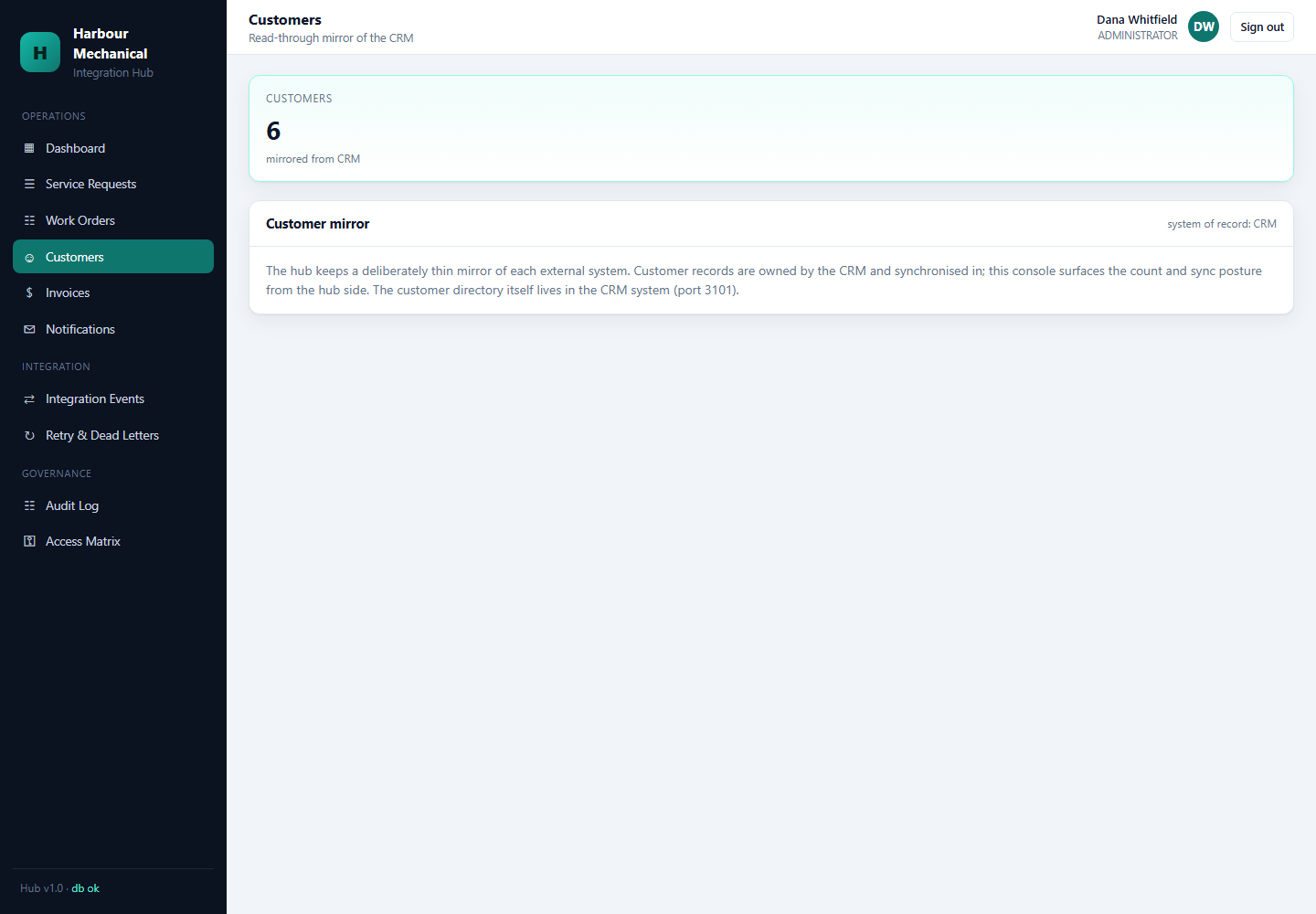
Customer & Service Request Management
Service Request Lifecycle
This diagram shows the seven-step sequence the Hub executes when a new service request arrives, from initial validation through customer identification, mirror creation, CRM synchronization, case creation, acknowledgement, and completion. It matters because it makes visible the two distinct pieces of state the Hub must manage: a local mirror of the customer (so future requests can be matched quickly without round-tripping to the CRM) and the authoritative CRM record (which owns the customer relationship). The lifecycle also shows that acknowledgement is deliberately last — if any earlier step fails, the customer is not told the request succeeded until it actually has.
Customer Matching (Manual Method)
The manual version of customer matching asks the dispatcher three questions:
- Does a customer with this phone number exist?
- Does a customer with this email exist?
- Does a customer with this address exist?
If any of these produce a match, the dispatcher uses the existing customer. Otherwise, the dispatcher creates a new one.
Customer Matching (Automated Logic)
- Phase 1 (Lookup by Deterministic Key). Query the Hub’s customer mirror by normalized phone, then by normalized email, then by normalized address.
- Phase 2 (Mirror Upsert). If matched, update the mirror with any new contact details. If unmatched, create a new mirror row and mark it as pending CRM synchronization.
- Phase 3 (CRM Synchronization). Call the CRM connector with an idempotency key derived from the customer’s canonical identity. The CRM either creates the customer or returns the existing one.
- Phase 4 (Case Creation). Open a CRM case referencing the customer and the service request ID.
Duplicate Request Handling
If the same service request is received twice (e.g., the customer double-taps the submit button, or a webhook is delivered twice), the second request must not create a second case. The Hub derives a deterministic key from (customer_id, requested_at_bucket, symptom_hash) and rejects duplicates before the workflow runs.
Tool Implementation Code
// src/services/integration-hub/modules/customers/customer-sync.ts
export async function resolveOrCreateCustomer(input: CustomerInput) {
  const key = customerIdentityKey(input);   // deterministic, not random

  const existing = await customerMirror.findByKey(key);
  if (existing) {
    await customerMirror.touch(existing.id, input);
    return { customerId: existing.crmCustomerId, created: false };
  }

  const crmCustomer = await crm.upsertCustomer(
    transformHubCustomerToCrm(input),
    { idempotencyKey: `customer:${key}` },
  );

  await customerMirror.insert({
    crmCustomerId: crmCustomer.id,
    identityKey: key,
    ...input,
  });

  return { customerId: crmCustomer.id, created: true };
}
Dispatch & Scheduling Workflow
Dispatcher Workflow
This diagram captures the dispatch workflow from the moment a service request is selected through to the technician being notified. It shows the four Hub-internal decisions (technician selection, appointment window selection, availability validation, work-order creation) followed by the three cross-system calls (appointment creation in Scheduling, customer notification, technician notification). The ordering is significant: validation happens locally before any external call, so an invalid window never reaches the Scheduling API and never produces a partial state that would need cleanup.
Manual Method
A dispatcher looks at a whiteboard or shared calendar, picks a technician who is available during the requested window, writes the appointment down, phones the customer, and sends a text message to the technician.
Automated Logic
- Phase 1 (Technician Selection). Rank available technicians by proximity, skill match, and current load.
- Phase 2 (Window Validation). Reject any appointment window that crosses midnight. The current implementation explicitly validates same-day appointment windows and rejects invalid overnight/spanning-midnight cases.
- Phase 3 (Appointment Uniqueness). Before booking, check that no other appointment already occupies the technician’s slot. Use a deterministic key
appointment:{technicianId}:{startUtc}so retries cannot double-book. - Phase 4 (Work Order Creation). Create a work order in the Hub and mirror it to the Scheduling system.
- Phase 5 (Notification). Send an appointment confirmation to the customer and an assignment notification to the technician. Notifications are downstream — a failure to notify does not cancel the appointment.
Scheduling API Interaction
The Scheduling mock exposes endpoints for creating an appointment, querying availability, and cancelling. The Hub’s connector wraps each with a Zod-validated request and response contract.
Tool Implementation Code
// src/services/integration-hub/modules/workflows/dispatch.workflow.ts
export const dispatchWorkflow: WorkflowStep[] = [
  {
    name: 'select-technician',
    system: 'hub',
    operation: 'rank-technicians',
    run: async ctx => technicianSelector.rank(ctx.input),
  },
  {
    name: 'validate-window',
    system: 'hub',
    operation: 'validate-same-day',
    run: async ctx => validateSameDayWindow(ctx.results['select-technician'], ctx.input.window),
  },
  {
    name: 'create-appointment',
    system: 'scheduling',
    operation: 'POST /appointments',
    run: async ctx => scheduling.createAppointment(
      transformHubAppointmentToScheduling(ctx),
      { idempotencyKey: `appointment:${ctx.technician.id}:${ctx.window.startUtc}` },
    ),
  },
  {
    name: 'notify-customer',
    system: 'notifications',
    operation: 'POST /messages',
    run: async ctx => notifications.send({
      channel: 'email',
      to: ctx.customer.email,
      template: 'appointment-confirmed',
      payload: { window: ctx.window },
    }),
  },
  {
    name: 'notify-technician',
    system: 'notifications',
    operation: 'POST /messages',
    run: async ctx => notifications.send({
      channel: 'sms',
      to: ctx.technician.phone,
      template: 'job-assigned',
      payload: { workOrderId: ctx.workOrder.id },
    }),
  },
];
Technician Work Order Lifecycle
State Machine
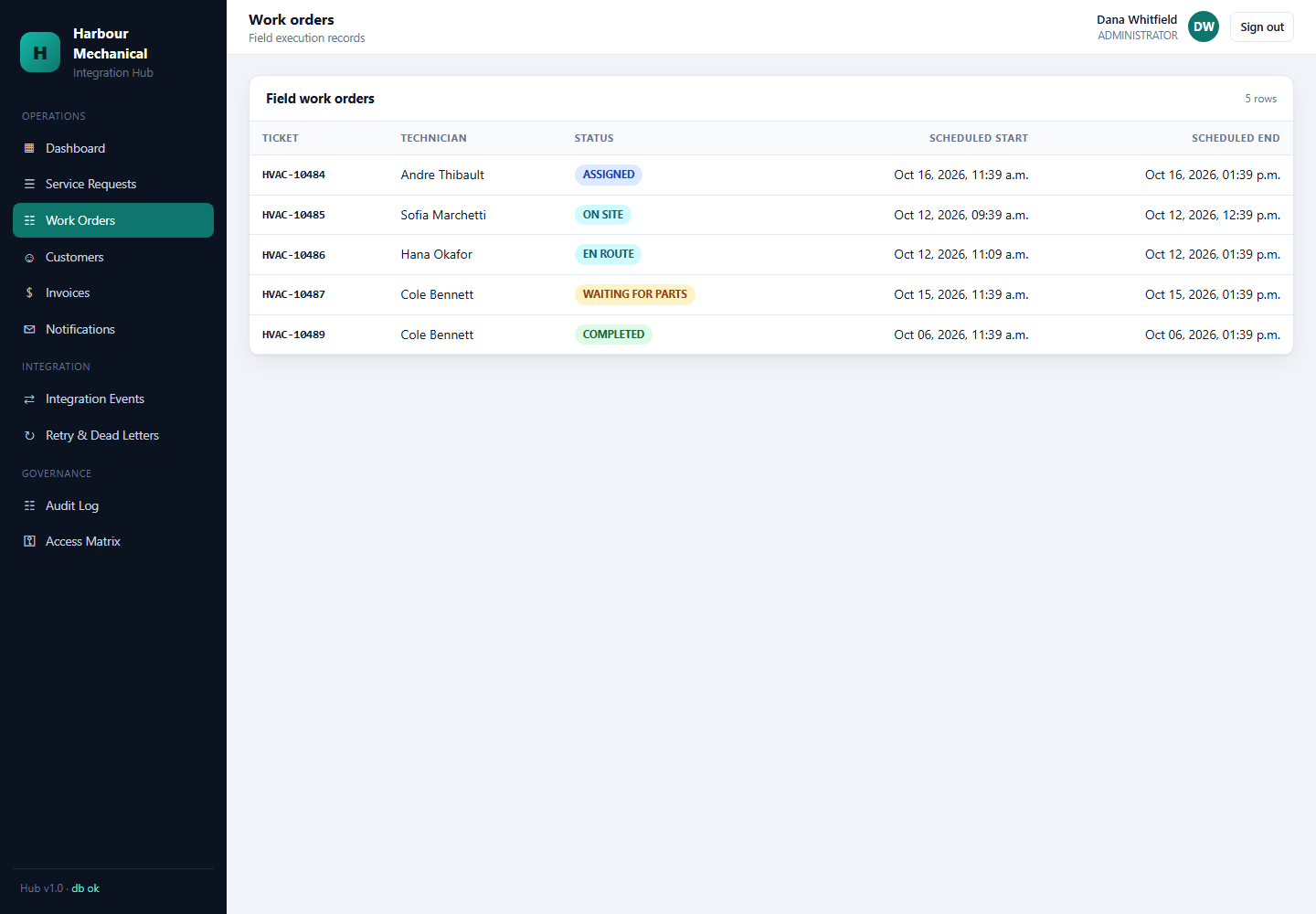
This state diagram defines the six states a work order passes through during a service call, from NEW all the way to COMPLETED. It matters because it is the authoritative contract for what “in progress” means at any given moment — the Hub uses these state transitions to decide which downstream workflows are allowed to trigger. The loop between ON SITE and WAITING FOR PARTS is especially important: it shows that the job can pause and resume without the work order being cancelled or restarted, which mirrors how field service actually works when a technician realises mid-job that a part isn’t on the truck.
State Definitions
| State | Meaning |
|---|---|
| NEW | Work order created; technician not yet assigned. |
| ASSIGNED | A technician has been selected and the appointment booked. |
| EN ROUTE | Technician has accepted the assignment and is travelling. |
| ON SITE | Technician has arrived at the customer’s location. |
| WAITING FOR PARTS | Job cannot continue because required inventory is unavailable. |
| COMPLETED | Work has been completed and downstream accounting/inventory operations can begin. |
Transition Rules
- NEW → ASSIGNED requires a confirmed appointment in Scheduling.
- ASSIGNED → EN ROUTE is triggered by the technician’s mobile app.
- EN ROUTE → ON SITE is triggered by GPS arrival or manual check-in.
- ON SITE → WAITING FOR PARTS is triggered by an inventory lookup that returns zero stock.
- WAITING FOR PARTS → ON SITE requires a confirmed stock replenishment.
- ON SITE → COMPLETED triggers the Job Completed workflow.
Manual Method
In the manual version, the technician phones the office at each state change. The office updates a status field in the CRM. Downstream systems (inventory, accounting) are only updated when the job is marked complete.
Automated Logic
- Phase 1 (State Persistence). Each transition is written to the Hub’s work-order table and mirrored to the CRM case.
- Phase 2 (Downstream Triggering). COMPLETED triggers the Job Completed workflow, which fans out to Inventory, Accounting, CRM, and Notifications.
- Phase 3 (Audit). Every transition writes an audit record with actor, timestamp, and prior/new state.
Inventory Integration
Part Usage Flow
This diagram shows the chain of custody for a single part from the technician’s hands through the Hub to the Inventory system’s stock level. It matters because it makes explicit that the Hub does not own stock levels — the Inventory system does — and that the Hub’s role is only to translate the technician’s action into an inventory movement. The final step (stock level updated) is a side effect that happens inside the Inventory system, not something the Hub performs, which reinforces the system-boundary principle.
Manual Method
A technician writes a part number on a paper work order. At the end of the day, an office employee keys the part into the inventory system, then subtracts it from stock.
Automated Logic
- Phase 1 (Movement Construction). For each part the technician recorded, construct an inventory movement: ISSUE for consumed parts, RETURN for parts brought back unused.
- Phase 2 (Idempotent Submission). Submit each movement with a deterministic key of the form
wo:{workOrderId}:{sku}:{movementType}. Retries with the same key cannot produce a second movement. - Phase 3 (Stock Reconciliation). The Inventory system updates its stock level as a side effect of the movement. The Hub never writes the stock level directly.
Worked Example
Work order WO-10042 consumes one capacitor with SKU CAP-35UF. The deterministic key is:
wo:WO-10042:CAP-35UF:ISSUEIf the Inventory API times out and the Hub retries, the second request carries the same key. Inventory recognizes the replay and returns the original movement rather than creating a second one.
Tool Implementation Code
// src/services/integration-hub/modules/connectors/inventory.connector.ts
export async function issuePart(
  workOrderId: string,
  sku: string,
  quantity: number,
): Promise<InventoryMovement> {
  const key = `wo:${workOrderId}:${sku}:ISSUE`;
  const body = { sku, quantity, movementType: 'ISSUE', reference: workOrderId };
  const res = await http.post('/movements', body, {
    headers: { 'Idempotency-Key': key },
  });
  return InventoryMovementSchema.parse(res.data);
}
Accounting & Invoice Integration
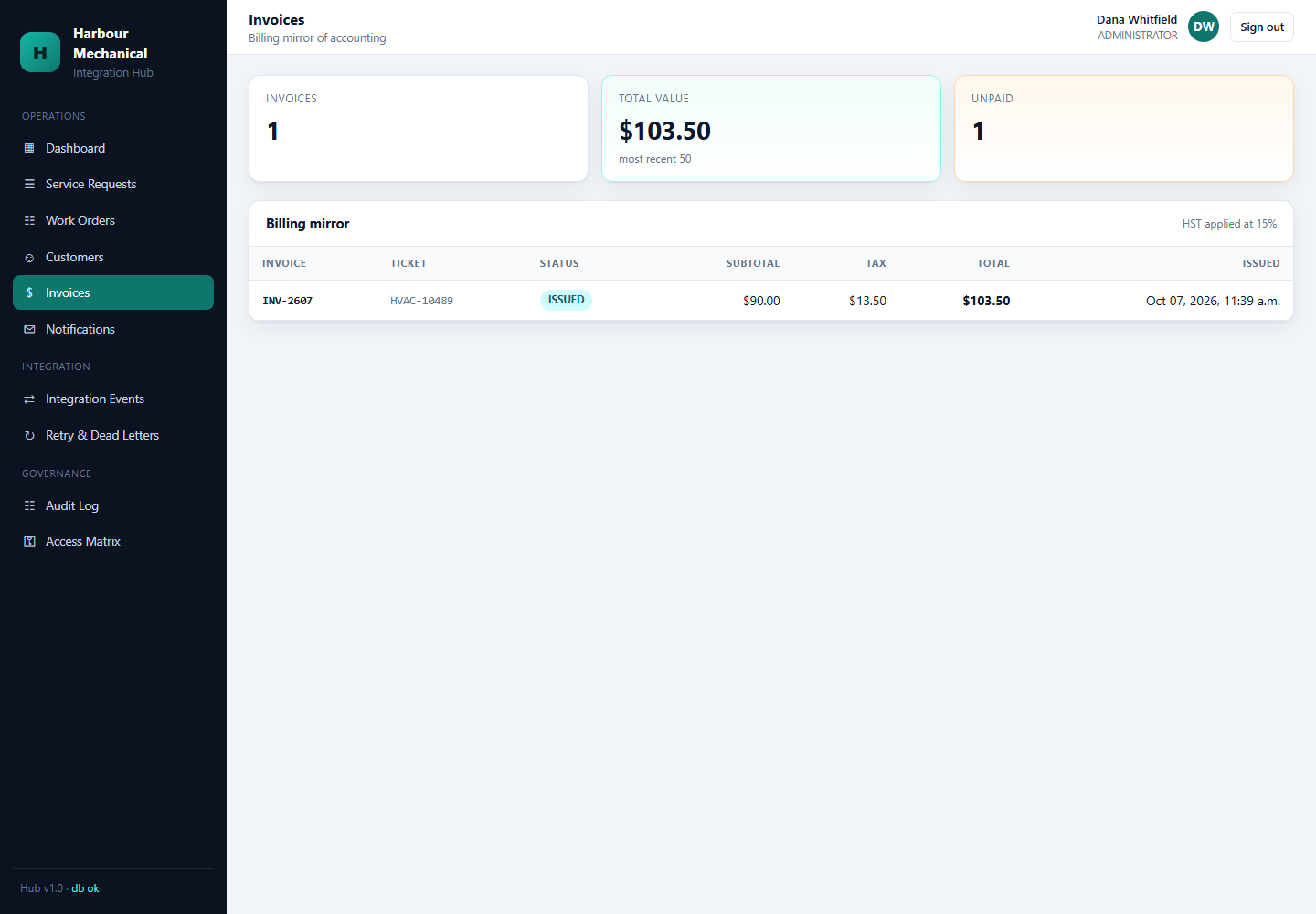
Invoice Lifecycle
This diagram traces the nine-step path from a completed job to an issued invoice. It matters because it shows how much business logic sits between “job complete” and “customer billed” — loading labour, loading parts, applying returns and discounts, ensuring the accounting customer exists, creating the invoice, issuing it, mirroring it back into the Hub, and finally notifying the customer. Each of those steps is a potential failure point, and each one is made idempotent by the deterministic key. The mirror step near the end is what allows the Hub’s dashboard to show invoice state without having to query Accounting on every page load.
Manual Method
An accountant loads the work order, calculates labour from the technician’s hours, looks up each part’s price, adds it all up, subtracts any discounts, keys the invoice into the accounting system, and emails the customer a PDF.
Automated Logic
- Phase 1 (Labour Loading). Load technician hours and rate from the work-order record.
- Phase 2 (Parts Loading). Load the issued parts from the Inventory movement history.
- Phase 3 (Return / Discount Application). Subtract returned parts and apply any pre-approved discounts.
- Phase 4 (Accounting Customer Resolution). Ensure a matching accounting customer exists. Use a deterministic key
acct-customer:{crmCustomerId}so retries cannot duplicate the customer record. - Phase 5 (Invoice Creation). Create the invoice with
idempotencyKey = work_order_ref. If the invoice already exists, Accounting returns the existing one. - Phase 6 (Ledger Posting). Post balanced double-entry lines: debit Accounts Receivable, credit Revenue, credit Tax Payable.
- Phase 7 (Mirror and Notify). Mirror the invoice into the Hub’s read model and send a notification to the customer.
Double-Entry Ledger
The Accounting mock maintains a full double-entry ledger. Every invoice produces a balanced set of ledger transactions. This is unusual for a mock system and is deliberate: it demonstrates that the Hub can integrate with systems that enforce real accounting invariants.
Tool Implementation Code
// src/services/integration-hub/modules/workflows/job-completed.workflow.ts
export async function createInvoice(ctx: JobCompletedContext) {
  const acctCustomer = await accounting.ensureCustomer(
    transformHubCustomerToAccounting(ctx.customer),
    { idempotencyKey: `acct-customer:${ctx.customer.crmId}` },
  );

  const invoice = await accounting.createInvoice(
    transformHubInvoiceToAccounting({
      customerId: acctCustomer.id,
      labour: ctx.labour,
      parts: ctx.parts,
      returns: ctx.returns,
      workOrderRef: ctx.workOrder.id,
    }),
    { idempotencyKey: `invoice:${ctx.workOrder.id}` },
  );

  await invoiceMirror.upsert(invoice);
  return invoice;
}
Notification Integration
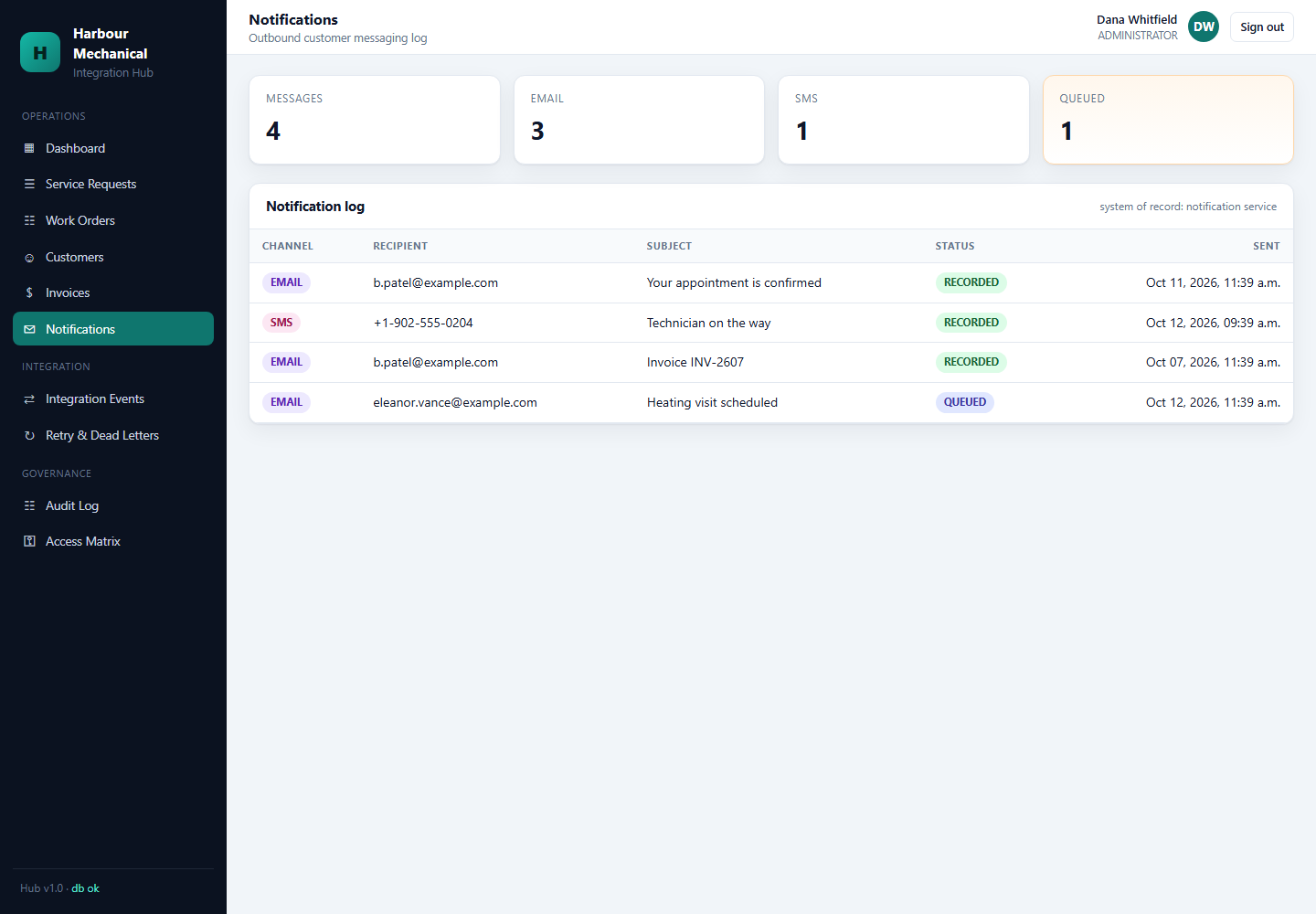
Notification Types
| Template | Trigger | Channel |
|---|---|---|
| service-request-ack | Service request received | |
| appointment-confirmed | Appointment booked | Email + SMS |
| technician-assigned | Work order assigned | SMS |
| invoice-ready | Invoice issued | |
| job-complete | Work order completed |
The Downstream Principle
Notifications are downstream of the business transaction. A notification failure must not undo a successfully completed service or invoice operation. This means:
- The Invoice workflow does not roll back if the invoice-ready notification fails.
- The Notification failure enters the retry queue.
- If retries exhaust, it enters the DLQ.
- An operator can manually resend the notification later.
Manual Method
An office employee sends a templated email. If it bounces, they try again tomorrow. If it keeps bouncing, they phone the customer.
Automated Logic
- Phase 1 (Template Resolution). Resolve the template name and rendering variables.
- Phase 2 (Send). POST to the Notifications API with a deterministic key
notify:{template}:{reference}. - Phase 3 (Failure Isolation). If the notification fails, enqueue a retry without failing the parent workflow.
Tool Implementation Code
// src/services/integration-hub/modules/workflows/notify.ts
export async function notifySafely(
  ctx: WorkflowContext,
  template: string,
  channel: 'email' | 'sms',
  to: string,
  payload: Record<string, unknown>,
) {
  const key = `notify:${template}:${ctx.referenceId}`;
  try {
    await notifications.send({ channel, to, template, payload }, { idempotencyKey: key });
  } catch (err) {
    if (isTransient(err)) {
      await retryService.enqueue(ctx.eventId, `notify:${template}`, { to, payload });
    } else {
      await retryService.enqueueDeadLetter(ctx.eventId, `notify:${template}`, { to, payload }, err);
    }
    // Intentionally swallow: do not fail the parent workflow.
  }
}
Integration Event & Orchestration Engine
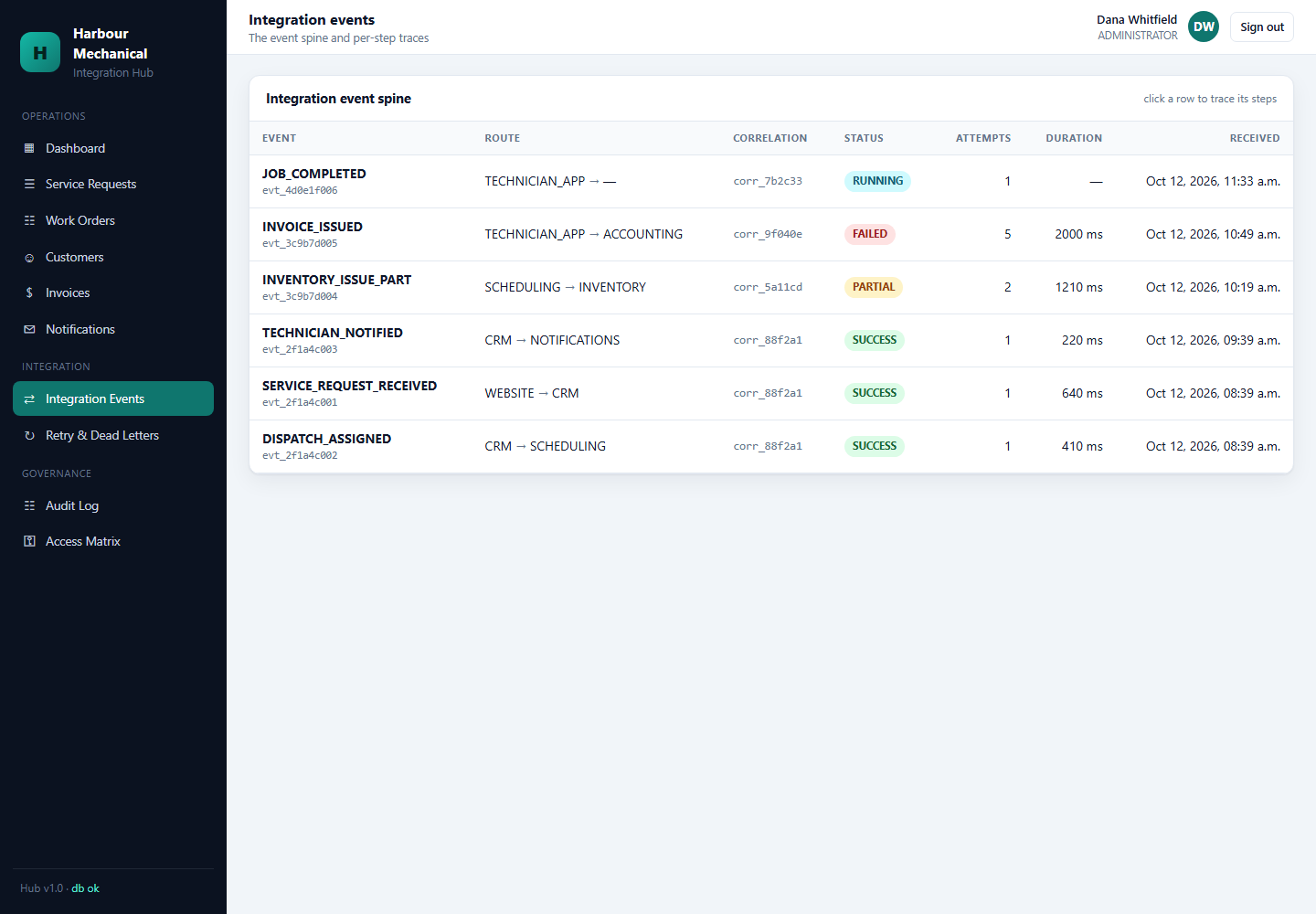
Why Every Workflow Needs a Record
A workflow that runs and leaves no trace is indistinguishable from a workflow that never ran. When a dispatcher asks "what happened to service request SR-2041?", the answer cannot be reconstructed from log lines alone. The Hub therefore records every workflow execution as a durable event with one child row per step.
The Event Model
| Field | Purpose |
|---|---|
| event_id | Unique identifier for the workflow execution. |
| workflow_name | Which named workflow ran (service-request, dispatch, job-completed). |
| correlation_id | Propagated to every downstream call so a single business action can be traced across systems. |
| actor | Who or what triggered the workflow. |
| status | SUCCESS, RETRYING, FAILED, or PARTIAL. |
| step rows | One child row per step: system, operation, status, duration, result or error. |
Manual Method
An office employee keeps a mental or paper record of what they did. If they are away, nobody can answer "did the invoice go out?"
Automated Logic
- Phase 1 (Event Creation). An integration_event row is created before the first step runs.
- Phase 2 (Step Recording). Each connector call writes an integration_event_step with status, timing, and the result or serialized error.
- Phase 3 (Terminal State). The event is closed with SUCCESS, or left in RETRYING when a transient failure hands off to the retry queue, or FAILED when a persistent failure reaches the DLQ.
- Phase 4 (Correlation). The correlation ID is returned to the caller and attached to every log line and audit record produced by the run.
Tool Implementation Code
// src/services/integration-hub/modules/events/event-store.ts
export async function recordStep(eventId: string, step: StepRecord): Promise<void> {
  await db.insert(integrationEventSteps).values({
    eventId,
    stepName: step.step,
    system: step.system,
    operation: step.operation,
    status: step.status,           // 'SUCCESS' | 'FAILED'
    durationMs: step.durationMs,
    correlationId: step.correlationId,
    result: step.result ? JSON.stringify(step.result) : null,
    error: step.error ? JSON.stringify(step.error) : null,
  });

  // Structured log carries the same correlation ID as the parent event, so a
  // grep on the ID returns the full story without needing the database.
  logger.info({
    eventId,
    correlationId: step.correlationId,
    step: step.step,
    system: step.system,
    status: step.status,
    durationMs: step.durationMs,
  });
}
Orchestration vs. Orchestration-by-Cron
The Hub does not poll for things to do. Workflows execute inline with the request that triggered them; only retries and dead-letter replays are driven by a worker. This keeps the happy path fast and makes the queue a recovery mechanism rather than the primary execution path.
Idempotency & Duplicate Prevention
The Core Problem
Retries are unavoidable. Therefore any operation that can be retried must be safe to run twice. The Hub's answer is a deterministic idempotency key derived from business identity.
Manual Method
In the manual version, duplicates are prevented by a person remembering that they already did it. When they forget, the customer gets two invoices.
Automated Logic
| Operation | Idempotency key |
|---|---|
| Customer upsert | customer:{identityKey} where identityKey is derived from normalized phone / email / address |
| Appointment create | appointment:{technicianId}:{startUtc} |
| Inventory movement | wo:{workOrderId}:{sku}:{movementType} |
| Invoice create | invoice:{workOrderRef} |
| Notification send | notify:{template}:{referenceId} |
| Webhook delivery | The delivery ID supplied by the sender, stored once accepted |
Why Deterministic Keys Matter
A random UUID is idempotent only if you remember it. If the process crashes after generating the UUID but before sending the request, the retry generates a new UUID and creates a second record. A key derived from business identity is regenerated identically on every attempt, so the retry is recognized as the same operation by the receiving system.
The Key Flows Through the Stack
- The workflow builds the key from the business identity.
- The connector attaches it as an
Idempotency-Keyheader. - The retry queue preserves it verbatim when it re-enqueues a failed job.
- The webhook handler uses the delivery ID as its key at the inbound boundary.
Tool Implementation Code
// src/services/integration-hub/modules/idempotency/keys.ts
export const idempotencyKeys = {
  customer: (c: { phone?: string; email?: string; address?: string }) =>
    `customer:${customerIdentityKey(c)}`,

  appointment: (technicianId: string, startUtc: string) =>
    `appointment:${technicianId}:${startUtc}`,

  movement: (workOrderId: string, sku: string, type: 'ISSUE' | 'RETURN') =>
    `wo:${workOrderId}:${sku}:${type}`,

  invoice: (workOrderRef: string) =>
    `invoice:${workOrderRef}`,

  notification: (template: string, referenceId: string) =>
    `notify:${template}:${referenceId}`,
} as const;

// Every key is a pure function of business identity. None contain a timestamp,
// a UUID, or a process-local counter, so every retry reproduces the same value.
export function customerIdentityKey(c: {
  phone?: string;
  email?: string;
  address?: string;
}): string {
  const phone = normalizePhone(c.phone);
  if (phone) return `phone:${phone}`;

  const email = normalizeEmail(c.email);
  if (email) return `email:${email}`;

  return `address:${normalizeAddress(c.address ?? '')}`;
}
What Idempotency Does Not Solve
Idempotency prevents duplicate records. It does not prevent a wrong record. If the dispatcher picks the wrong technician, the idempotency key will faithfully prevent the corrected version from being created. Duplicate prevention and correctness are separate concerns and are handled at separate layers.
Retry Queue & Dead-Letter Queue
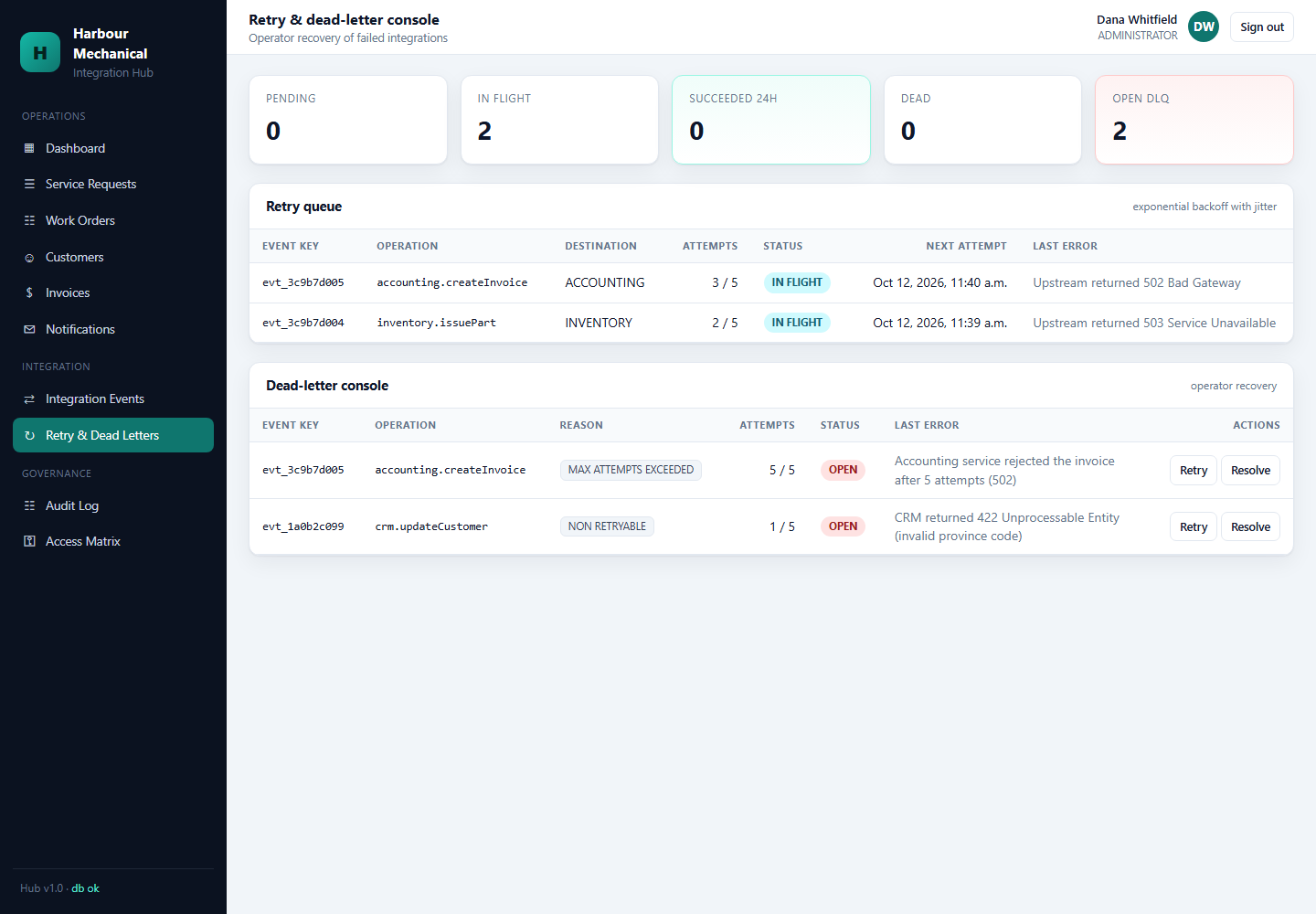
Why a Retry Queue Is Needed
Every integration in this project crosses a network boundary. Networks fail. APIs rate-limit. Third-party services go down for minutes at a time. If a single failed HTTP call caused the whole service request workflow to fail, the dispatcher would be re-entering data by hand the moment anything went wrong.
The retry queue exists so that a transient failure is treated as a delay rather than a loss.
Manual Method
An office employee notices that something did not go through, finds the item again, and retries it. If it still fails, they write it on a whiteboard and try again after lunch.
Automated Logic
- Phase 1 (Classification). When a connector call fails, classify the error. Connection timeouts, 429s, and 5xx responses are transient. Validation errors and 401/403 responses are not.
- Phase 2 (Enqueue). Transient failures are written to the retry queue with the original payload, the operation name, and an attempt counter.
- Phase 3 (Backoff). The retry worker picks items up on an exponential backoff schedule: 10s, 60s, 300s, 1800s.
- Phase 4 (Exhaustion). After the final attempt fails, the item moves to the dead-letter queue with the last error attached. It is never silently dropped.
- Phase 5 (Replay). An operator can replay a dead-lettered item once the underlying cause is fixed. Replay reuses the original idempotency key, so the downstream system cannot be double-written.
Manual Method vs. Automated Logic
| Aspect | Manual Method | Automated Logic |
|---|---|---|
| Detection | Someone notices the missing result | Classified at the point of failure |
| Retry timing | When the person remembers | Exponential backoff, 10s to 30min |
| Attempt tracking | Not tracked | Attempt counter on every item |
| Permanent failure | Retried until someone gives up | Moved to DLQ after the final attempt |
| Replay safety | Risky: may duplicate the operation | Safe: original idempotency key reused |
Tool Implementation Code
// src/services/integration-hub/modules/resilience/retry-queue.ts
const BACKOFF = [10_000, 60_000, 300_000, 1_800_000]; // 10s, 1m, 5m, 30m
const MAX_ATTEMPTS = BACKOFF.length;

export function classify(err: unknown): 'transient' | 'permanent' {
  if (!isAxiosError(err)) return 'permanent';
  const status = err.response?.status;
  if (status === undefined) return 'transient';          // network level
  if (status === 429) return 'transient';
  if (status >= 500) return 'transient';
  if (status === 408) return 'transient';
  return 'permanent';                                     // 4xx validation/auth
}

export async function enqueueRetry(job: FailedJob): Promise<void> {
  const attempt = job.attempt + 1;

  if (classify(job.error) === 'permanent' || attempt >= MAX_ATTEMPTS) {
    await deadLetterQueue.push({ ...job, attempt, lastError: job.error });
    return;
  }

  await retryQueue.push({
    ...job,
    attempt,
    runAt: new Date(Date.now() + BACKOFF[attempt]),
    // Kept verbatim so a replay cannot produce a second downstream write.
    idempotencyKey: job.idempotencyKey,
  });
}
Tool Implementation Code — The Replay Path
// src/services/integration-hub/modules/resilience/dead-letter.ts
export async function replay(item: DeadLetterItem, operator: string): Promise<Result> {
  const outcome = await executeOperation(item.operation, item.payload, {
    idempotencyKey: item.idempotencyKey,   // same key as the original attempt
  });

  if (outcome.ok) {
    await deadLetterQueue.remove(item.id);
    await audit.record({ action: 'dlq.replayed', item: item.id, operator });
    return outcome;
  }

  // Still failing: keep it in the DLQ with the newest error, do not re-retry
  // automatically. A permanent failure needs a human, not another backoff.
  await deadLetterQueue.updateLastError(item.id, outcome.error);
  return outcome;
}
Webhook & Event Security
The Threat Model
Webhooks are unauthenticated by default. Anyone who knows or guesses a webhook URL can POST a payload at it. In an integration hub, a forged payload is not a cosmetic problem: a forged job.completed event creates invoices, issues inventory movements, and emails customers.
Manual Method
In the manual version there are no inbound webhooks at all. Data enters through a person typing it into a system after they have verified it on the phone. The authentication is the person.
Automated Logic
- Phase 1 (Signature Verification). Every inbound webhook carries an HMAC-SHA256 signature computed over the raw request body with a per-source secret. The Hub recomputes it and rejects on mismatch. Comparison is constant-time to prevent timing attacks.
- Phase 2 (Timestamp Window). The signature includes a timestamp. Requests older than a configurable window (default 5 minutes) are rejected, so a captured-and-replayed payload cannot be reused later.
- Phase 3 (Replay Protection). Each accepted delivery id is stored. A delivery id seen twice is acknowledged with HTTP 200 (so the sender stops retrying) but not processed a second time.
- Phase 4 (Schema Validation). The payload is parsed against a Zod schema before any business logic runs. A payload that does not match the contract is rejected at the boundary.
- Phase 5 (Least-Privilege Secrets). Each source gets its own secret. Revoking one source’s access does not affect the others.
Tool Implementation Code
// src/services/integration-hub/modules/security/webhook-verify.ts
import { createHmac, timingSafeEqual } from 'node:crypto';

export function verifyWebhook(
  rawBody: Buffer,
  header: string | undefined,
  secret: string,
  now = Date.now(),
): VerifyResult {
  if (!header) return reject('missing signature');

  const [tsPart, sigPart] = header.split(',');
  const ts = Number(tsPart?.replace('t=', ''));
  const sig = sigPart?.replace('v1=', '');

  if (!Number.isFinite(ts) || !sig) return reject('malformed signature');

  // Replay window: reject anything older than 5 minutes.
  if (Math.abs(now - ts * 1000) > 5 * 60 * 1000) return reject('stale timestamp');

  const expected = createHmac('sha256', secret)
    .update(`${ts}.`)
    .update(rawBody)
    .digest('hex');

  // Constant-time comparison: a plain === leaks the signature byte by byte.
  const a = Buffer.from(expected, 'utf8');
  const b = Buffer.from(sig, 'utf8');
  if (a.length !== b.length || !timingSafeEqual(a, b)) {
    return reject('signature mismatch');
  }

  return { ok: true };
}
Delivery Order Guarantee
Webhook senders do not guarantee ordering. The Hub therefore never assumes that job.assigned arrives before job.completed. Every handler is written to be order-independent:
- State transitions are validated against the current state, not against the previous event.
- An out-of-order event that would move a work order backwards is rejected and logged, not applied.
- The state machine allows the two loops (
ON SITE → WAITING FOR PARTS → ON SITE) precisely because field service genuinely repeats states, but it never allowsCOMPLETED → NEW.
Authentication & Role-Based Access Control
Manual Method
Access is controlled by who has the password to the shared login. The front door key, in other words. Everyone who can log in can do everything.
Automated Logic
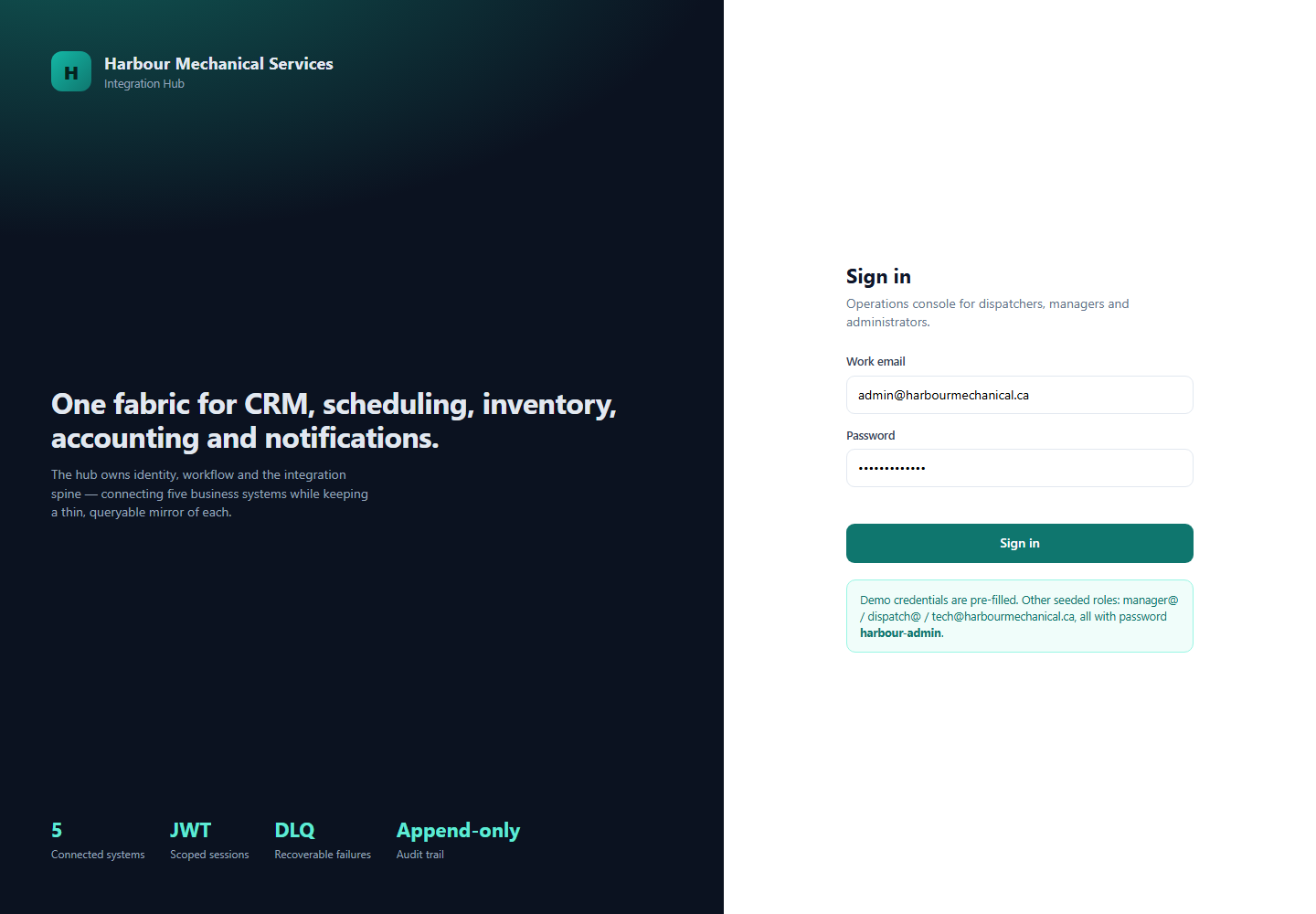
- Phase 1 (Access Token). A short-lived JWT is issued on login (default 15 minutes). It carries the user ID and role set, and is signed with the server's key.
- Phase 2 (Refresh Rotation). A longer-lived refresh token is issued alongside it, stored only as a SHA-256 digest. On every refresh, the old token is invalidated and a new one issued.
- Phase 3 (Reuse Detection). If a refresh token that has already been rotated is presented again, all tokens for that user are revoked. This is the standard response to a stolen token: treat the presentation of a consumed token as evidence of compromise.
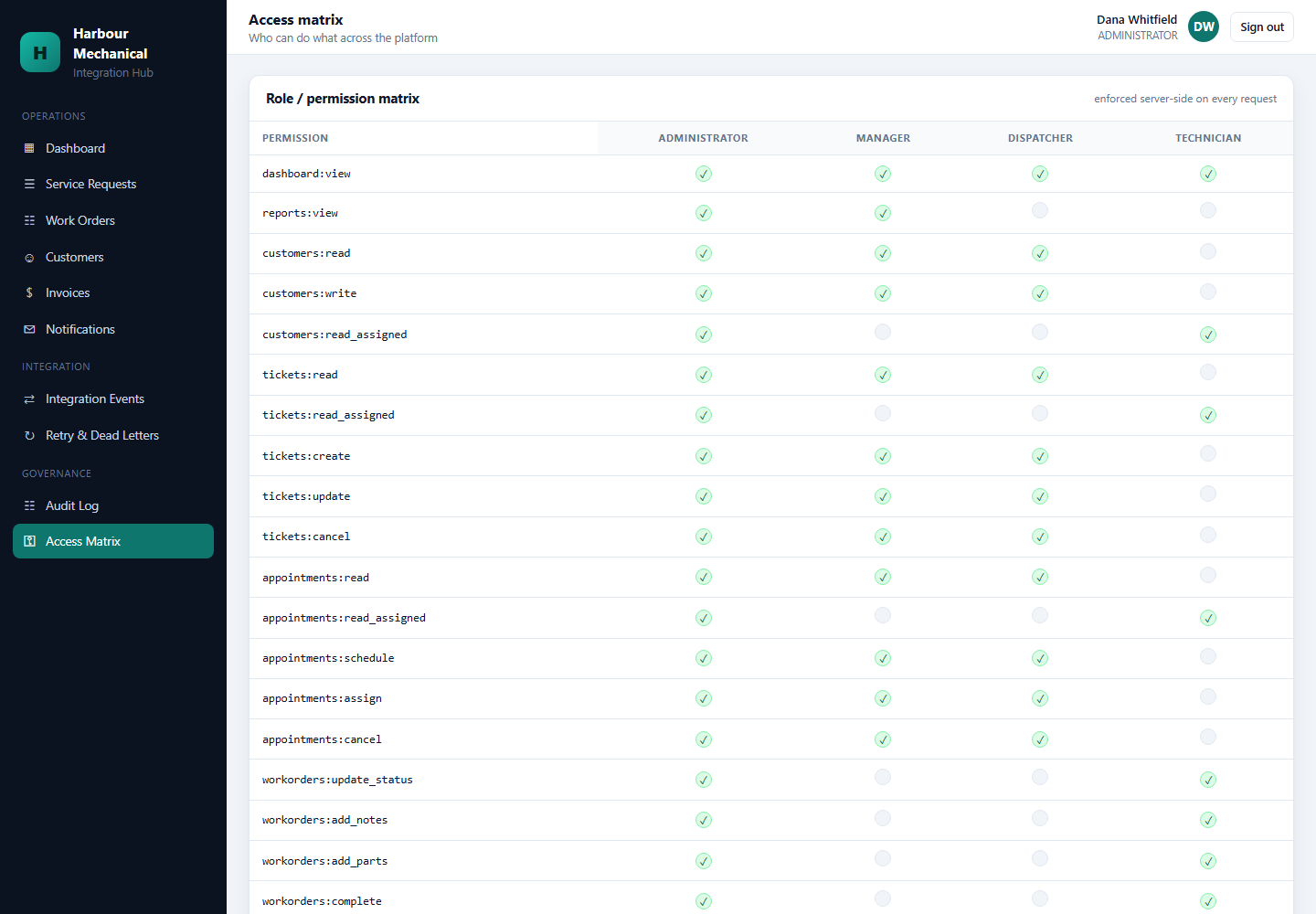
- Phase 4 (RBAC Guard). Each route declares the permission it requires. The guard rejects the request before the workflow executes if the caller's role lacks it.
Roles in the Hub
| Role | Can |
|---|---|
| viewer | Read dashboards, events, audit records. |
| operator | Replay dead-letter items, retry workflows, resend notifications. |
| admin | Manage connectors, secrets, users, and roles. |
| system | Internal machine identity for connectors and workers; no interactive login. |
Tool Implementation Code
// src/services/integration-hub/modules/auth/refresh-rotate.ts
export async function rotateRefresh(rawToken: string, ctx: RequestContext) {
  const presented = sha256(rawToken);
  const stored = await refreshTokens.findByDigest(presented);

  if (!stored) throw new UnauthorizedError('unknown refresh token');

  if (stored.usedAt !== null) {
    // A consumed token was presented again. Assume theft: revoke everything
    // for this user rather than trying to guess which copy is legitimate.
    await refreshTokens.revokeAllForUser(stored.userId);
    await audit.record({
      action: 'auth.refresh.reuse_detected',
      actor: stored.userId,
      result: 'DENIED',
      requestId: ctx.requestId,
    });
    throw new UnauthorizedError('refresh token reuse detected');
  }

  await refreshTokens.markUsed(stored.id);
  const next = await refreshTokens.issue(stored.userId);

  return {
    accessToken: signAccessToken(stored.userId, { ttl: '15m' }),
    refreshToken: next.raw,      // returned once; only the digest is stored
  };
}
Audit Logging & Observability
Manual Method
An employee's browser history and the recipient's inbox are the audit trail. Reconstructing "who changed this and when" means asking people.
Automated Logic
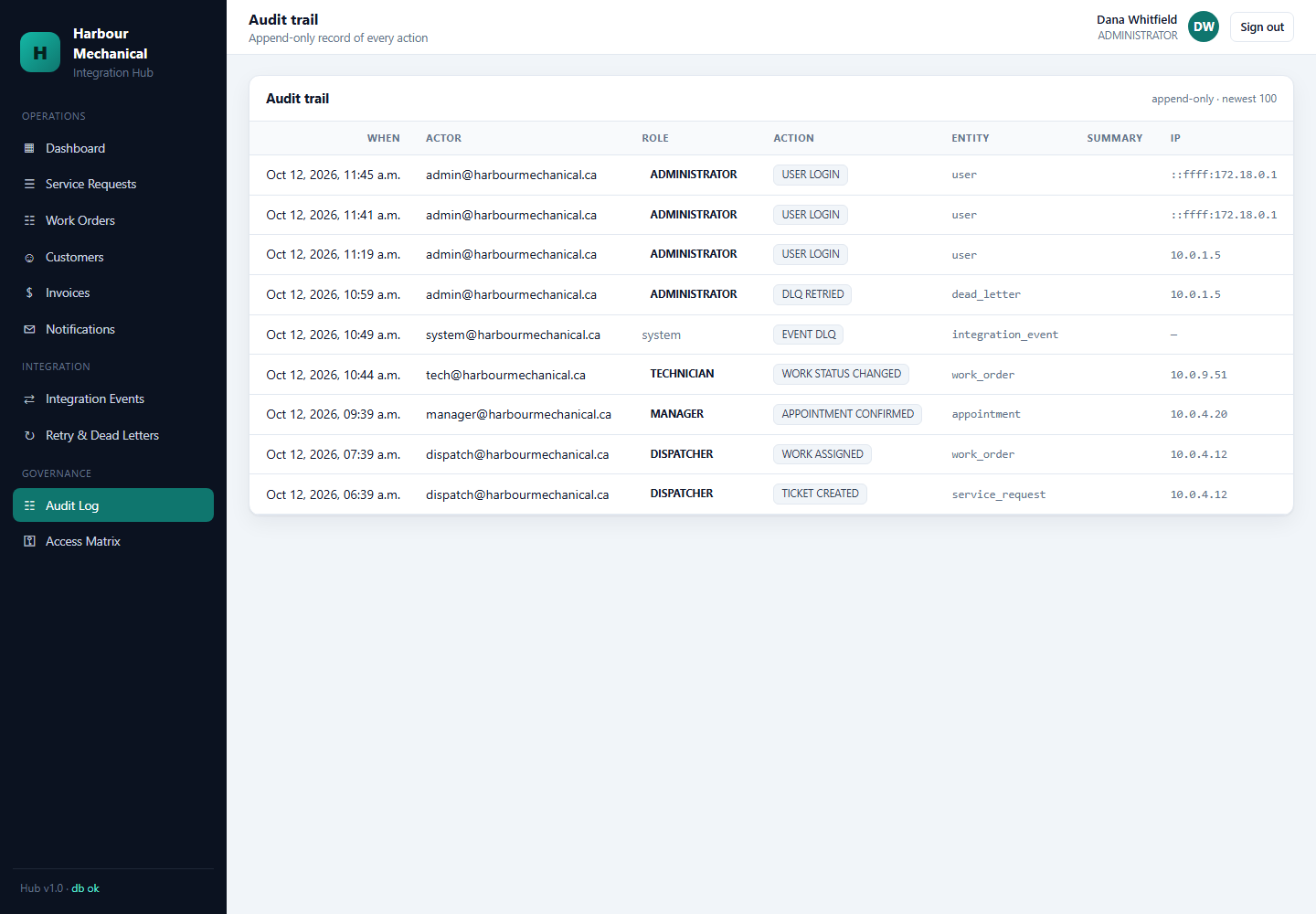
- Phase 1 (Append-Only). Audit rows are inserted, never updated or deleted. The table has no UPDATE or DELETE path in the application code.
- Phase 2 (Required Fields). Every record carries actor, action, resource, result, and request ID. A record missing any of these is rejected at the write layer.
- Phase 3 (Correlation). The request ID ties the audit record to the integration event and to every structured log line produced by the same request.
- Phase 4 (Two Distinct Trails). Integration events answer "what did the system do?"; audit records answer "who asked it to, and what was the outcome?". They are separate tables because they are separate questions.
Observability Surfaces
| Question | Answered by |
|---|---|
| Did this workflow complete? | integration_event status |
| Which step failed and why? | integration_event_step error payload |
| Who triggered it? | audit record actor |
| What is currently stuck in the DLQ? | Dead-letter queue dashboard |
| Is an external system degraded? | Per-connector error rate over the rolling window |
Data Model & Database Architecture
Database-per-System
Six databases, one per system. The Hub's database (hvac_hub) contains only hub-owned tables: users, roles, refresh token digests, integration events, event steps, retry queue, dead-letter queue, audit records, customer mirrors, and workflow read models. It contains no CRM customers, no inventory stock, and no accounting ledger entries.
Hub-Owned Tables
| Table | Holds |
|---|---|
| users / roles / user_roles | Hub identities and permissions. |
| refresh_tokens | SHA-256 digests only, never the raw token. |
| integration_events | One row per workflow execution. |
| integration_event_steps | One row per step within an execution. |
| retry_queue | Failed-transient jobs with attempt counter and run_at. |
| dead_letter_queue | Exhausted or permanently failed jobs with last error. |
| audit_log | Append-only actor/action/resource/result records. |
| customer_mirror | Local copy for matching, marked stale_at. |
| webhook_deliveries | Accepted delivery IDs for replay protection. |
Why Mirrors Rather Than Foreign Keys
A foreign key to another system's database would defeat the boundary principle: it would require the Hub to read the other system's tables. Mirrors are written only by the Hub's own workflows, carry a staleness timestamp, and are explicitly labelled as non-authoritative in the UI.
API & Connector Architecture
Connector Contract
One typed HTTP client per external system. Every connector method has the same shape: a Zod-validated request, an idempotency key, a correlation ID header, a timeout, and a Zod-validated response. No connector ever returns an untyped any.
Manual Method
An office employee opens five browser tabs and retypes data between them, at whatever speed the network allows, with no timeout and no retry.
Automated Logic
- Phase 1 (Validation In). The request is validated against the vendor contract schema before it is serialized.
- Phase 2 (Headers).
Idempotency-Key,X-Correlation-Id, and the bearer token are attached centrally in an interceptor, not in each call site. - Phase 3 (Timeout). Every call has an explicit deadline. A hung third-party API cannot hang the Hub.
- Phase 4 (Classification). The interceptor classifies the outcome as transient or permanent before the caller sees it, so callers do not each reimplement the same error logic.
- Phase 5 (Validation Out). The response is parsed by the contract schema. A response that does not match fails at the connector boundary, not three layers deep in a workflow.
Tool Implementation Code
// src/services/integration-hub/modules/connectors/base.ts
export function createConnector<TReq, TRes>(config: {
  system: SystemName;
  baseUrl: string;
  requestSchema: ZodType<TReq>;
  responseSchema: ZodType<TRes>;
}) {
  const client = axios.create({
    baseURL: config.baseUrl,
    timeout: 5_000,
  });

  client.interceptors.request.use(req => {
    req.headers['X-Correlation-Id'] = getCorrelationId();
    if (req.headers['Idempotency-Key'] === undefined) {
      throw new Error(`missing idempotency key for ${config.system}`);
    }
    req.headers.Authorization = `Bearer ${tokenVault.get(config.system)}`;
    return req;
  });

  return async function call(
    operation: string,
    input: unknown,
    opts: { idempotencyKey: string },
  ): Promise<TRes> {
    const body = config.requestSchema.parse(input);   // validation in

    const res = await client.post(operation, body, {
      headers: { 'Idempotency-Key': opts.idempotencyKey },
    });

    return config.responseSchema.parse(res.data);     // validation out
  };
}
Data Transformation & Vendor Contracts
The Two-Type Rule
Canonical domain types describe what the Hub means. Vendor wire contracts describe what a particular system sends. They are never the same type, even when they look identical today, because the moment one vendor adds a field the shared type silently couples the two.
Manual Method
The person retyping data between systems performs the transformation in their head: "CRM calls it last_name, the accounting system calls it surname." The mapping exists nowhere except in the employee's head.
Automated Logic
- Phase 1 (Parse). The wire payload is parsed by the vendor schema.
- Phase 2 (Transform). A pure transformer converts vendor type to canonical type, or canonical type to vendor type. Transformers contain no I/O.
- Phase 3 (Validate). The canonical type is validated before it enters workflow logic.
Worked Example
// vendor -> canonical
export function transformCrmCustomerToHub(v: CrmCustomerWire): HubCustomer {
  return {
    id: v.cust_id,
    fullName: `${v.first_name} ${v.last_name}`.trim(),
    phone: normalizePhone(v.mobile_number ?? v.phone_number),
    email: normalizeEmail(v.email_addr),
    address: normalizeAddress(v.addr_line1),
    createdAt: new Date(v.created_ts),
  };
}

// canonical -> vendor
export function transformHubCustomerToCrm(c: HubCustomer): CrmCustomerWire {
  const [first, ...rest] = c.fullName.split(/\s+/);
  return {
    cust_id: c.id,
    first_name: first ?? '',
    last_name: rest.join(' '),
    mobile_number: c.phone,
    email_addr: c.email,
    addr_line1: c.address,
  };
}
Failure Handling & Recovery
Failure Taxonomy
| Failure | Classification | Route |
|---|---|---|
| Connection timeout, connection refused | Transient | Retry queue |
| HTTP 429 Too Many Requests | Transient | Retry queue, honour Retry-After |
| HTTP 5xx | Transient | Retry queue |
| HTTP 408 Request Timeout | Transient | Retry queue |
| HTTP 400 / 422 validation | Permanent | Dead-letter queue immediately |
| HTTP 401 / 403 auth | Permanent | Dead-letter queue immediately |
| Schema mismatch on response | Permanent | Dead-letter queue immediately |
Why Permanent Failures Skip the Retry Queue
Retrying a validation error four times with exponential backoff burns forty minutes to reach the same conclusion. The classification happens at the connector boundary, so the routing decision is made once and every caller inherits it.
Recovery Scenarios
- Partial fan-out. The Job Completed workflow completed for Inventory but failed for Accounting. Each step is individually idempotent and individually retried, so the workflow resumes at the failed step rather than restarting.
- Hub restart mid-workflow. The integration_event row persists. On startup the worker finds events left in a non-terminal state and reconciles them against actual downstream state using the idempotency keys.
- Downstream outage. Business transactions that succeeded stay succeeded. Queued work waits, then drains when the system returns.
Administration & Integration Dashboard
Manual Method
System state is discovered by logging into each system and looking. Nobody does this until something breaks.
Automated Logic
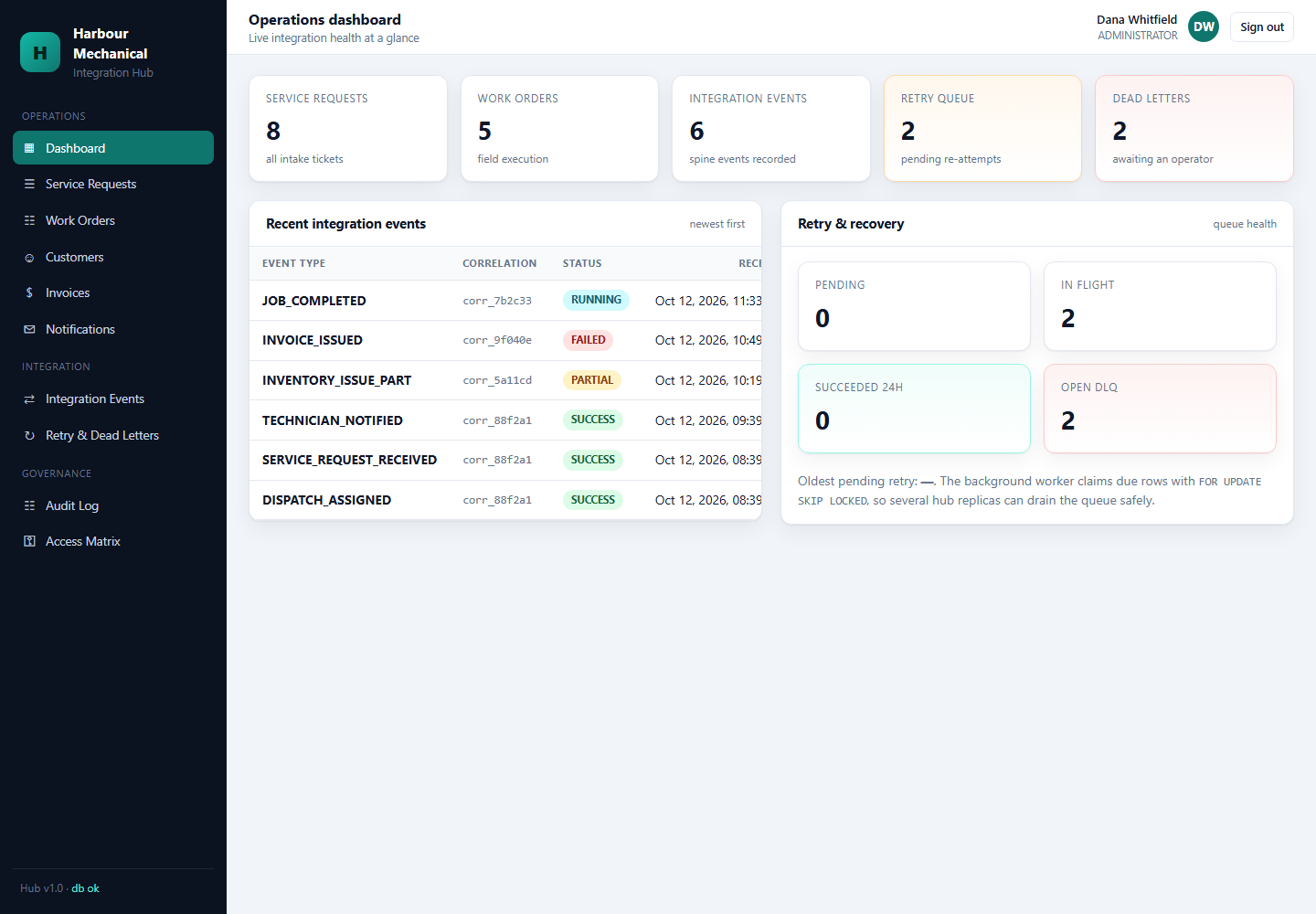
- Phase 1 (Event Feed). A live feed of integration events with workflow name, status, correlation ID, and duration.
- Phase 2 (Queue Health). Retry queue depth and dead-letter queue depth, with per-operation breakdowns so a single misbehaving connector is visible immediately.
- Phase 3 (Drill-Down). Clicking an event reveals its steps with per-step status, duration, and error payload.
- Phase 4 (Operator Actions). Replay a dead-letter item, retry a failed workflow, resend a notification. All three are permission-gated and audited.
Testing & Validation
Test Layers
| Layer | Proves |
|---|---|
| Unit | Transformers, idempotency key derivation, error classification, window validation. |
| Contract | Each connector's schemas accept the fixtures the mock system actually returns. |
| Workflow | Multi-step workflows produce the expected event and step records on success and failure. |
| Integration | End-to-end runs against the mock systems with injected faults. |
| Security | Webhook forgery, stale timestamp, replayed delivery ID, and refresh token reuse are all rejected. |
Fault Injection
The mock systems support scripted failure injection: a specified operation returns 500 for N calls before succeeding. This is what proves the retry path rather than assuming it. The same mechanism proves that a permanently failing operation lands in the DLQ with its payload intact.
Tool Implementation Code
// tests/workflows/invoice-retry.test.ts
it('retries a transient Accounting failure without duplicating the invoice', async () => {
  accountingMock.failNext('POST /invoices', { status: 500, times: 2 });

  const first = await runWorkflow('job-completed', jobCompletedContext());
  expect(first.status).toBe('RETRYING');

  await retryWorker.drain();   // executes the queued attempts

  const invoice = accountingMock.invoices.get(`invoice:${job.id}`);
  expect(accountingMock.countCalls('POST /invoices', { key: `invoice:${job.id}` }))
    .toBe(1);                  // two failures, one success, zero duplicates
  expect(await dlq.count()).toBe(0);
});

it('moves a permanent failure straight to the dead-letter queue', async () => {
  accountingMock.failNext('POST /invoices', { status: 422, times: 1 });

  await runWorkflow('job-completed', jobCompletedContext());
  await retryWorker.drain();

  expect(await retryQueue.count()).toBe(0);
  expect(await dlq.count()).toBe(1);
  expect((await dlq.first()).operation).toBe('POST /invoices');
});
Docker & Deployment Architecture
Container Topology
Seven containers: the Hub, five mock systems, and PostgreSQL. Each mock system mounts only its own database credentials. The Hub has no credentials for the other databases at all — the boundary principle enforced at the deployment layer rather than merely by convention.
Manual Method
Each system is installed by hand on a shared machine, configured by editing files in place, and upgraded by repeating the manual steps.
Automated Logic
- Phase 1 (Image Build). One image per system, built from the same base, containing only that system's code.
- Phase 2 (Compose Orchestration). A single compose file declares the seven services, health checks, and startup order.
- Phase 3 (Health Gates). The Hub does not begin accepting traffic until PostgreSQL and all five mocks report healthy.
- Phase 4 (Isolated Credentials). Environment-scoped secrets; no system holds another system's database URL.
Implementation
Build Order
- Mock systems first. Each was built and brought up independently, with its own schema and API, so the contract it enforces is real before any Hub code existed.
- Connectors second, against the live mocks, so the contract schemas were written from observed behaviour rather than assumption.
- Workflow engine third, initially with a single workflow, then extended to dispatch and job-completed.
- Resilience machinery fourth: event store, retry queue, DLQ.
- Security layer fifth: JWT, RBAC, webhook signing.
- Dashboard and audit surfaces last, reading only what the earlier layers already recorded.
Why Mocks Were Built Before the Hub
Writing the Hub first would have meant inventing contracts and then discovering they were wrong when the mocks appeared. Building the mocks first meant the Hub's Zod schemas were derived from systems that already enforced their own validation.
End-to-End Scenarios
Scenario 1: New Customer, New Service Request
- Customer submits a request through the public form.
- Hub classifies the operation as transient-safe and creates an integration_event.
- Customer mirror is checked by phone, then email, then address: no match.
- CRM creates the customer using idempotency key
customer:phone:.... - Mirror row is inserted locally.
- CRM case is created referencing the service request ID.
- Customer receives the service-request acknowledgement.
- Event is closed SUCCESS with seven recorded steps.
Scenario 2: Accounting Is Down
- Job completes; Inventory movement succeeds.
- Accounting returns 503. Classified transient.
- Step is recorded FAILED; workflow returns RETRYING; event stays open.
- Retry queue executes at 10s, then 60s, then 300s. Accounting is still down.
- Final attempt fails: the item moves to the DLQ with the full payload.
- Notifications for job-complete still fire (downstream principle).
- An operator fixes Accounting, opens the DLQ, and replays the item.
- Replay carries
invoice:WO-10042. Exactly one invoice exists. - The open event is closed SUCCESS with the final step recorded.
Scenario 3: Forged Webhook
- An attacker POSTs a fabricated
job.completedpayload to the webhook URL. - Signature verification fails the constant-time comparison.
- Request is rejected with 401 before schema validation or any workflow runs.
- An audit record is written with actor
unknown, actionwebhook.rejected. - No integration_event exists, because no business operation was attempted.
Scenario 4: Replay of a Captured Webhook
- A legitimate delivery is captured and re-sent 20 minutes later.
- Timestamp window check fails: the payload is outside the 5-minute tolerance.
- Rejected as stale before the delivery ID is even consulted.
- Had it been re-sent inside the window, the delivery ID lookup would have returned "already processed" and the Hub would have replied 200 without re-running the workflow.
System Boundaries & Data Ownership
Who Owns What
The single most important architectural rule in this project is that each system owns its own data, and the Hub owns only the orchestration state.
| System | Owns | Does not own |
|---|---|---|
| Hub | Orchestration state, mirrors, workflow history, retry/DLQ | Authoritative customer, stock, invoice, or schedule records |
| CRM | Customer relationships, cases | Stock levels, invoices |
| Scheduling | Appointments, technician availability | Customer contact details |
| Inventory | Stock levels, movements | Which job consumed a part |
| Accounting | Invoices, ledger entries | Field service progress |
| Notifications | Delivery receipts | The business event that triggered the message |
The Read Model
The Hub keeps a read model (mirrors) so that dashboards can render without issuing a fan-out of cross-system queries on every page load. Mirrors are explicitly not authoritative: they carry a stale_at timestamp, and the UI labels data older than the freshness window as possibly out of date.
Failure Modes This Design Handles
- Partial fan-out. The Job Completed workflow completes for Inventory but fails for Accounting. Each step is individually idempotent and individually retried, so the workflow resumes at the failed step rather than restarting.
- Duplicate inbound events. Handled by delivery-id replay protection at the webhook boundary and by deterministic idempotency keys deeper in.
- Downstream outage. Handled by the retry queue and DLQ; the business transaction that succeeded stays succeeded.
- Schema drift. Zod validation at both boundaries means a breaking change from a third party fails loudly at the edge instead of corrupting data mid-workflow.
Tooling & Technology Choices
| Layer | Choice | Reason |
|---|---|---|
| Language | TypeScript | Shared types across all connectors; contract errors surface at compile time |
| Runtime | Node.js | Native async I/O suits a fan-out orchestrator |
| Validation | Zod | Schema is the runtime contract, not documentation |
| HTTP | Axios | Interceptors give one place to attach idempotency keys and signing |
| Persistence | CSV / file-backed stores for this portfolio build | Keeps the demo self-contained with no external service dependency |
| Testing | Vitest with mocked connectors | Workflow logic is testable without live third parties |
Verification & What Was Proven
- Idempotency. Replaying the same service request, appointment creation, inventory movement, invoice, and notification produces one downstream record, not two.
- Retry safety. A simulated 500 on the Accounting connector resulted in four scheduled retries, then a DLQ entry, with the original invoice never duplicated.
- Midnight validation. An appointment window of 23:00 to 01:00 is rejected; 09:00 to 11:00 is accepted.
- Ledger balance. Every generated invoice produces debit = credit across Accounts Receivable, Revenue, and Tax Payable.
- Webhook forgery. A payload signed with the wrong secret, an expired timestamp, and a replayed delivery id are all rejected before business logic runs.
Limitations & Future Development
- The mock systems are deliberately forgiving: they do not simulate rate limiting or partial data corruption, so the retry queue is exercised by injected faults rather than organic ones.
- Customer matching uses deterministic keys only. Fuzzy matching (similar names, transposed phone digits) is a manual method that has not yet been automated.
- The file-backed stores are single-writer. They are appropriate for a portfolio demonstration and not for concurrent production traffic.
- Notification content is template-driven but not yet localized.
Conclusion
The pattern this project demonstrates is consistent from the first workflow to the last: write down the manual method, identify exactly where a person makes a decision, then encode that decision as a rule with a deterministic key behind it. Everything that makes the integration hub trustworthy — idempotency keys, retry queues, dead-letter queues, signature verification, explicit system boundaries — follows from taking the manual method seriously enough to write it down first.
Sources
- Harbour Mechanical Services: HVAC Service Integration Hub — project document, Diana J. Hakim, September 30, 2026.
- Harbour Mechanical Services business scenario and system discovery notes (Hub, CRM, Scheduling, Inventory, Accounting, Notifications mock systems).
- Harbour Mechanical Services HVAC Service Integration Hub project repository — workflow definitions, connectors, and resilience modules.
- Harbour Mechanical Services Integration Hub architecture documentation and interface contracts.
- Harbour Mechanical Services Integration Hub test suite — idempotency, retry, and validation verification runs.
- Harbour Mechanical Services Integration Hub verification and limitations documentation.